





7 Benefits of Worker Guidance Using a Digital Worker Guidance System
hat are digital work instructions?
The name says it all: digital work instructions are step-by-step instructions that do not require paper. They are, so to speak, a digital guide for an employee's day-to-day work that can be used on any electronic device such as a PC, tablet or smartphone. But not all digital is the same and, in any case, what's so bad about paper-based work instructions? Let's take a look at the differences:

Work instructions (paper-based)
The not even so common classic: everything that needs to be done is written step by step on one (or more) sheets of paper. The worker takes the appropriate paper for their work order and works through it. However, paper doesn't highlight errors during processing or validate measured values. However, paper does provide space for notes that can be evaluated afterwards.

Digital work instructions (Excel, PDF, etc.)
Digital documents form the first stage of digital work instructions. Whether Excel, PDF or Word - everything that used to be on a sheet of paper can now be made available in the form of a file on an end device. However, the documents themselves are just as static as traditional work instructions and take a lot of time to create, version and follow up.

Digital work instructions via worker assistance system
The optimum version of digital work instructions comes from a digital system such as a worker assistance system. Here, instructions can be easily created and versioned, delivered in line with qualifications, prepared for error-free processing and automatically documented. When it comes to efficiency and quality-assured work, there is no way around digital work instructions in a worker guidance system.
Writing work instructions - you should pay attention to this

But let's take another step back. Why? A poorly prepared work instruction will not lead to sustainable success in any system. So let's first take a look at how you write work instructions - whether on paper or in a worker assistance system.
Writing work instructions: General information
When creating work instructions, you define the standard operating procedure (SOP) for recurring process sequences. This idea already makes it clear that work instructions must always be created for a sub-process. Cross-departmental work instructions, for example from goods receipt to goods issue, are inevitably doomed to failure. You should also ensure that your templates are consistent: inconsistently structured work instructions with varying structures make life difficult for your employees and increase the risk of errors.
Writing work instructions: basic information content
Every work instruction consists of a set of basic information that clarifies the most important questions relating to a work order. This information includes
-
the purpose: What is this activity to be carried out for?
-
the responsibility: Who is to carry out this activity?
-
the work process: What tasks are to be completed?
-
the sequence of the work steps: How is the activity to be carried out step by step?
-
the workplace: Where is the work to be carried out?
-
the tools: What is needed to carry out the task?
-
Instructions and visual representations: What must be observed?
-
Quality specifications: When has an activity been carried out successfully?
-
Measured values and data: What data must be adhered to or documented?
Writing work instructions: additional information
Depending on the work order, additional information may be required. The work instruction should also be able to provide this, e.g:
-
Quantity / amount: How often must this activity be carried out?
-
Time specifications: How long may it take to complete?
-
Occupational safety: How are safety and occupational health and safety compliance ensured?
-
Version number and date: How up-to-date is the work instruction?
-
Change history: What changes have been made since the last revision?
-
Customer specifications: What special customer requirements are there?
Writing work instructions: Checking the work instruction
Creating work instructions is only half the battle. Before the instructions go to your workers, you should check them thoroughly for
-
comprehensibility and correctness of the content
-
a uniform design and, if necessary, compliance with the corporate design
-
consistent use of technical terms
-
unambiguous and clear language
Write work instructions: test, collect feedback, optimize
If everything fits, you can start testing the work instruction. Let your workers work with it and observe what problems and errors arise. Then optimize the work instruction accordingly.
Also define feedback processes. The most important comments on your work instructions come from the people who have to work with them. Their feedback is worth its weight in gold for continuous optimization.
6 good reasons for digital work instructions
Now that we've seen everything that goes into a good work instruction, the benefits of digital work instructions from a comprehensive system become abundantly clear. We want to give you six reasons why work instructions from a worker assistance system will definitely pay off for you.
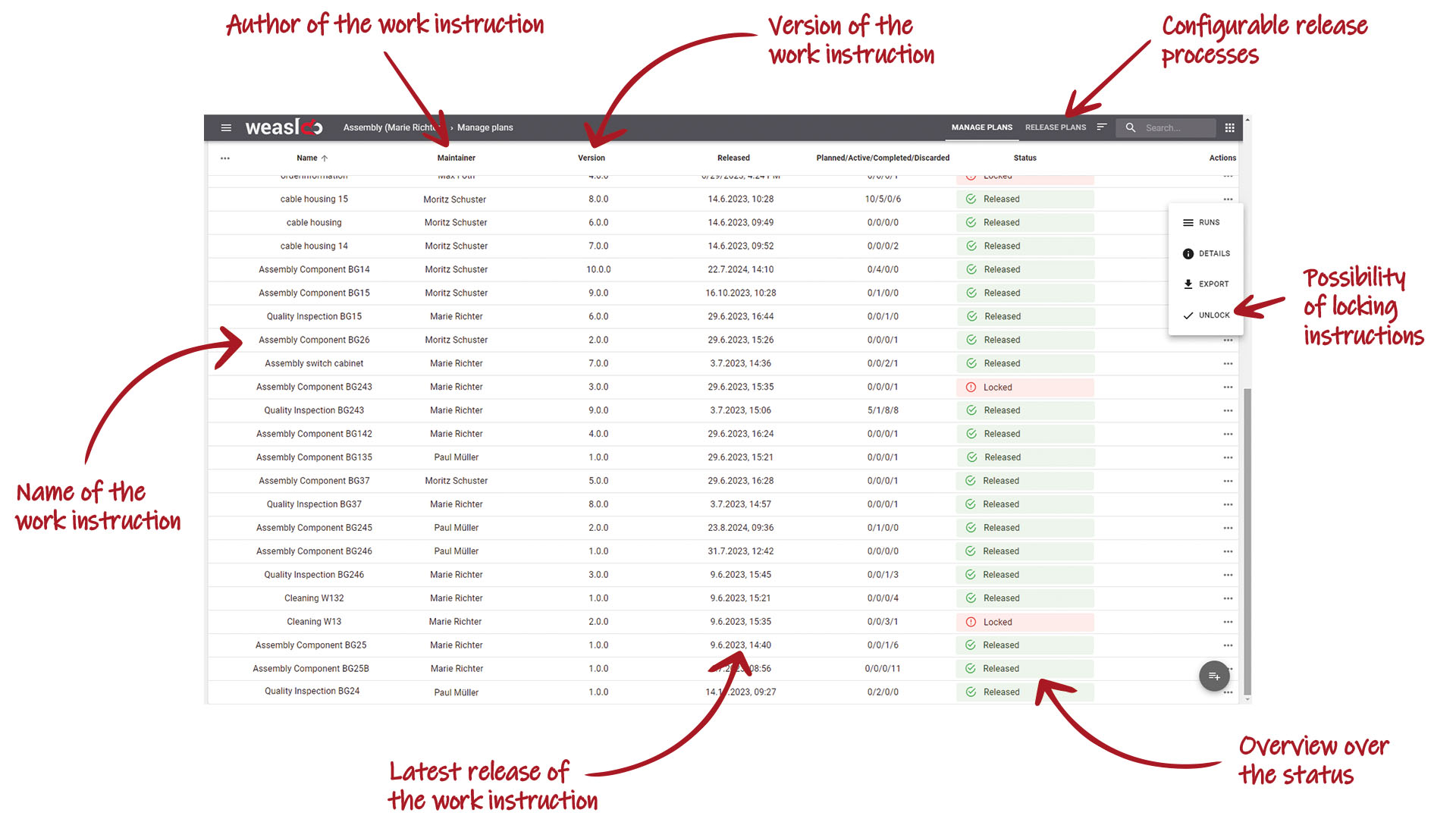
1. digital work instructions = less effort for versioning and distribution
One of the most important reasons for digital work instructions from a worker assistance system is the simple versioning and paperless distribution of your documents from a central location. You can make the updated work instruction immediately available at the touch of a button.
This ensures smooth production processes and efficient document control and ensures that no outdated instructions are in circulation. You can also easily distribute the digital work instructions in other languages and to other locations to ensure company-wide standards.
Your employees can rely on automatically being provided with the right information at the right time and in the right place. Time-consuming reconciliations are eliminated and job satisfaction increases.
2. digital work instructions make it easier for your employees
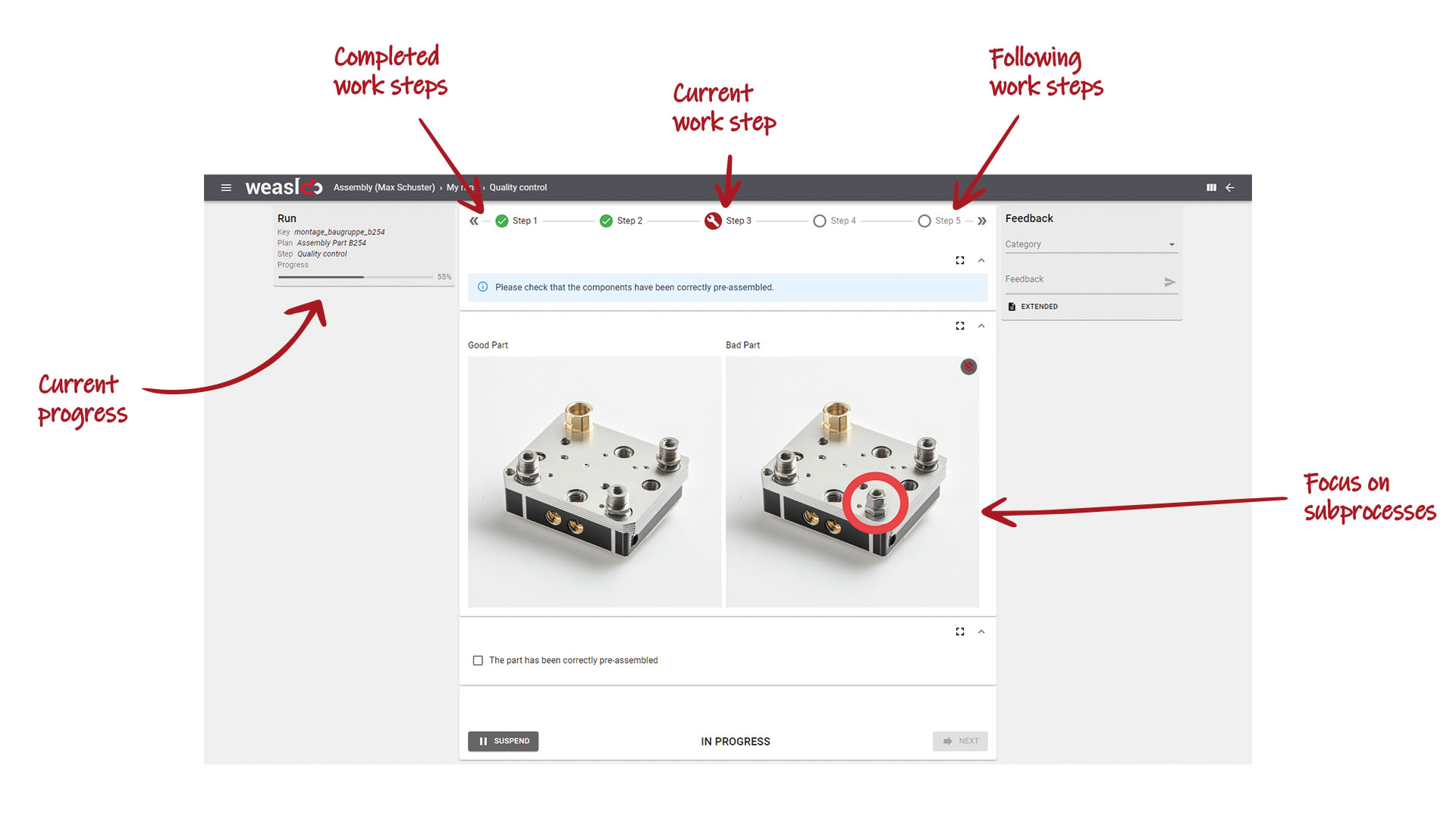
Mistakes often happen due to a lack of clarity and a loss of concentration. If you have to work your way through long documents or "scroll through" tables, you can easily overlook or forget something.
With digital work instructions, you can reduce extensive or complex work instructions to a presentation of the next process step. This ensures better structuring of the work instruction itself and reduces the mental workload of your employees. You can also incorporate process blocks at critical points to ensure that errors are effectively avoided. This enables your workers to work faster, more efficiently and without errors.
3. digital work instructions provide guidance in line with qualifications
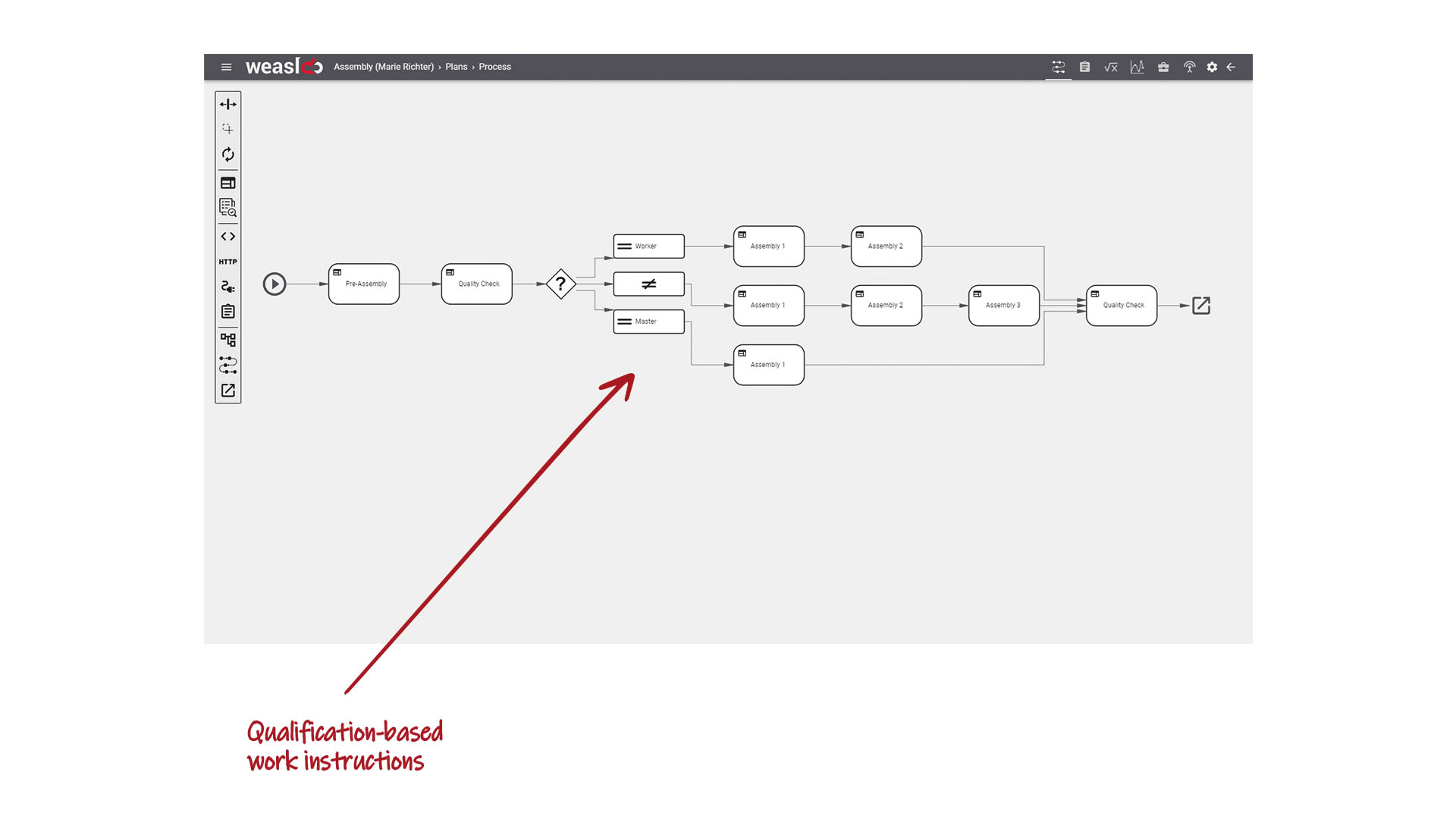
The way in which something is explained has a significant impact on your employee's performance. Inexperienced workers need more detailed instructions and information compared to their experienced colleagues.
While your workers have to prepare all the information themselves with conventional work instructions, the digital work instructions from a worker assistance system provide them with the appropriate level of detail without any further intervention.
This is particularly useful for training or familiarization with new processes. On the one hand, digital work instructions save time here, and on the other, they make it easier to deploy employees flexibly. With digital work instructions, even inexperienced employees can carry out more complex processes reliably.
4. you increase the informative value of your work instructions
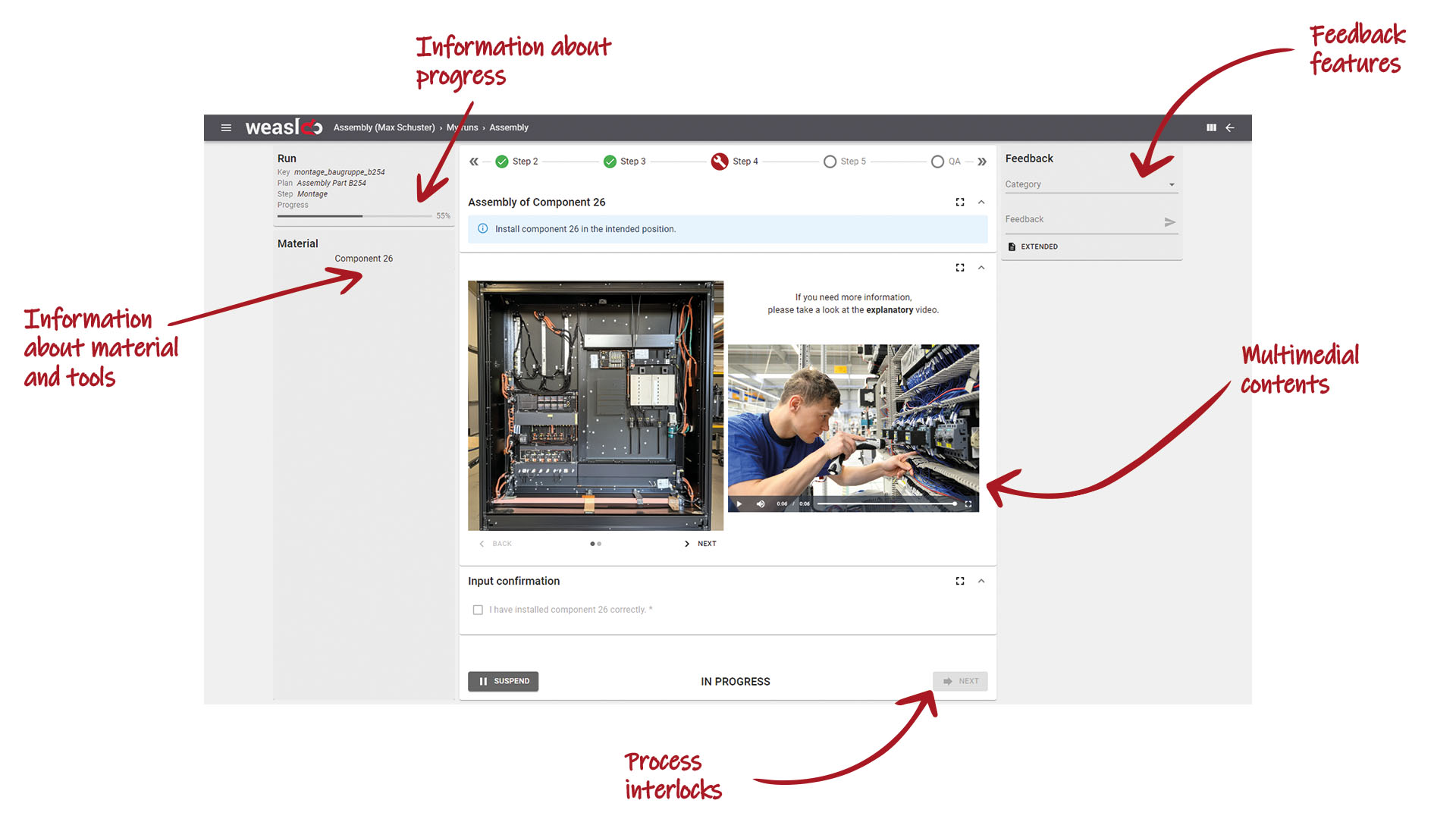
Both paper-based and classic digital work instructions in the form of Excel or PDF are limited in their display options. With digital work instructions from a worker assistance system, you can improve the clarity of your descriptions.
In addition to images, videos and PDF documents, you also have the option of integrating 3D models, Excel data or CAD drawings. Add parts list information and increase the relevance of the work instruction.
Provide visualizations directly in the work step and, if required, limit them to a specific section or mark important points with notes. Speaking of notes: Measured value entries can also be easily color-coded to indicate whether a measured value is within (green) or outside (red) the predefined range.
5. digital work instructions increase transparency and traceability
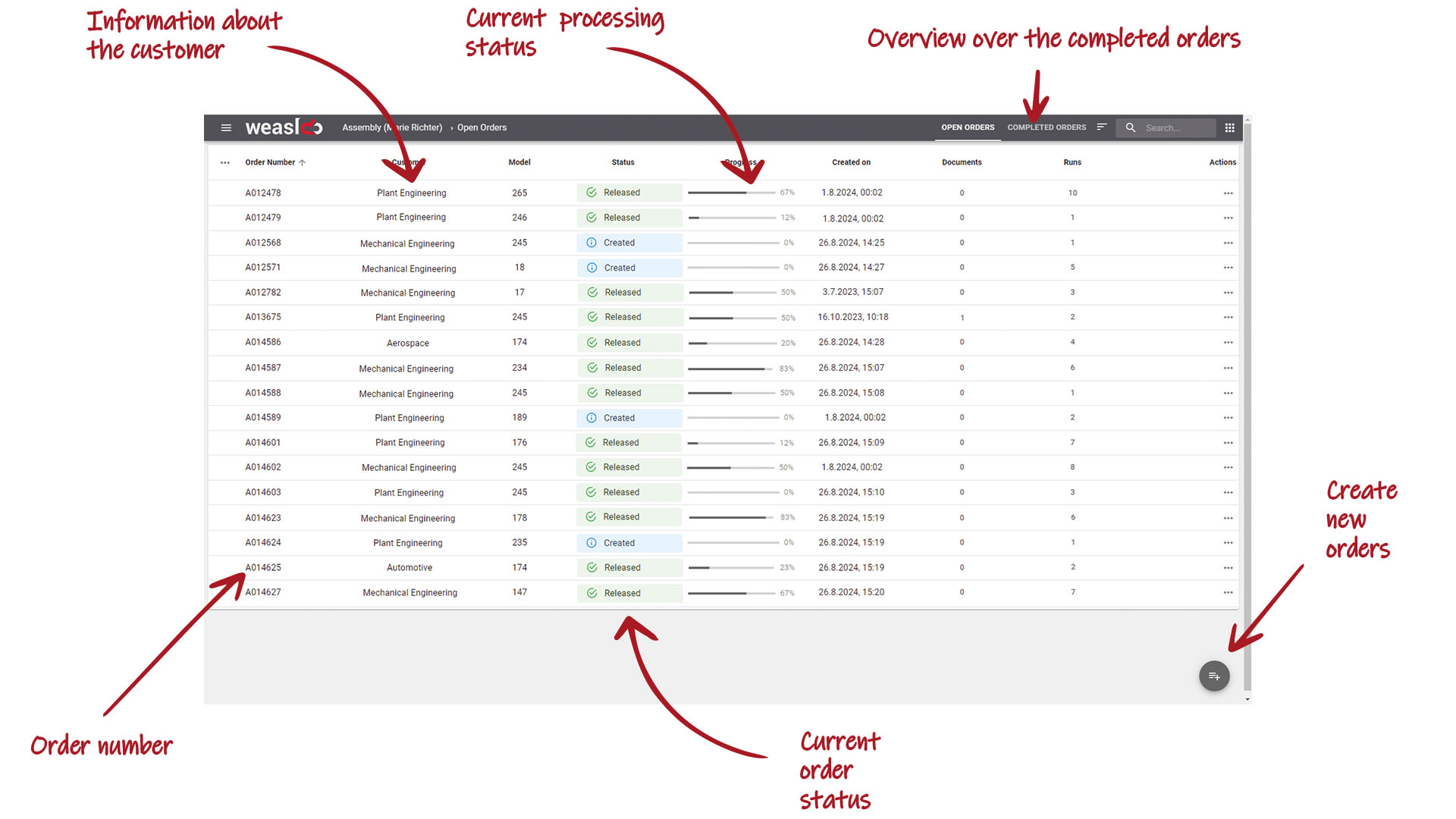
With digital work instructions from a worker assistance system, you can create a continuous flow of information - in both directions. While you always provide up-to-date information, you capture data directly from the workplace. Through the worker's input, the digital work instruction enables basic shop floor data collection or process data collection.
The system gives you a direct overview of the progress made during processing. In addition, all steps are documented digitally and consistently. This facilitates any traceability, for example in the event of complaints, and also saves on tedious downstream documentation work.
6. reduce costs with digital work instructions
Digital work instructions from a worker assistance system are invaluable when it comes to optimizing internal processes and making them more efficient. You save time by reducing the effort involved in creating, maintaining and distributing work instructions. Clear and up-to-date instructions help you avoid errors, rework and therefore waste. You also train your employees much faster. And all this directly reduces your costs.
And another argument for all those who still work with paper-based work instructions: You can also save on the costs of paper, printing, reprinting on revision, archiving and storage with digital work instructions.
How do you make existing (digital) work instructions fit for the future?
1. switch to a digital system
If you are still working with paper instructions, then switch directly to software for creating and displaying digital work instructions, such as a worker assistance system. Don't bother with Excel and the like, as this will not solve your challenges.
If you are already working with instructions in digital formats or with bills of materials from an ERP, import these into a modern software solution.
When selecting a system, pay particular attention to the following criteria:
-
User-friendliness: Is the chosen software easy and intuitive to use - both for the plan creator and the worker? Can the content be displayed attractively on all the end devices you use? Does the system meet all your requirements?
-
Accessibility: Is the system accessible from different locations?
-
Data protection and data security: How is the protection of sensitive personal data guaranteed? What options are there for setting up access controls?
2. create new digital work instructions
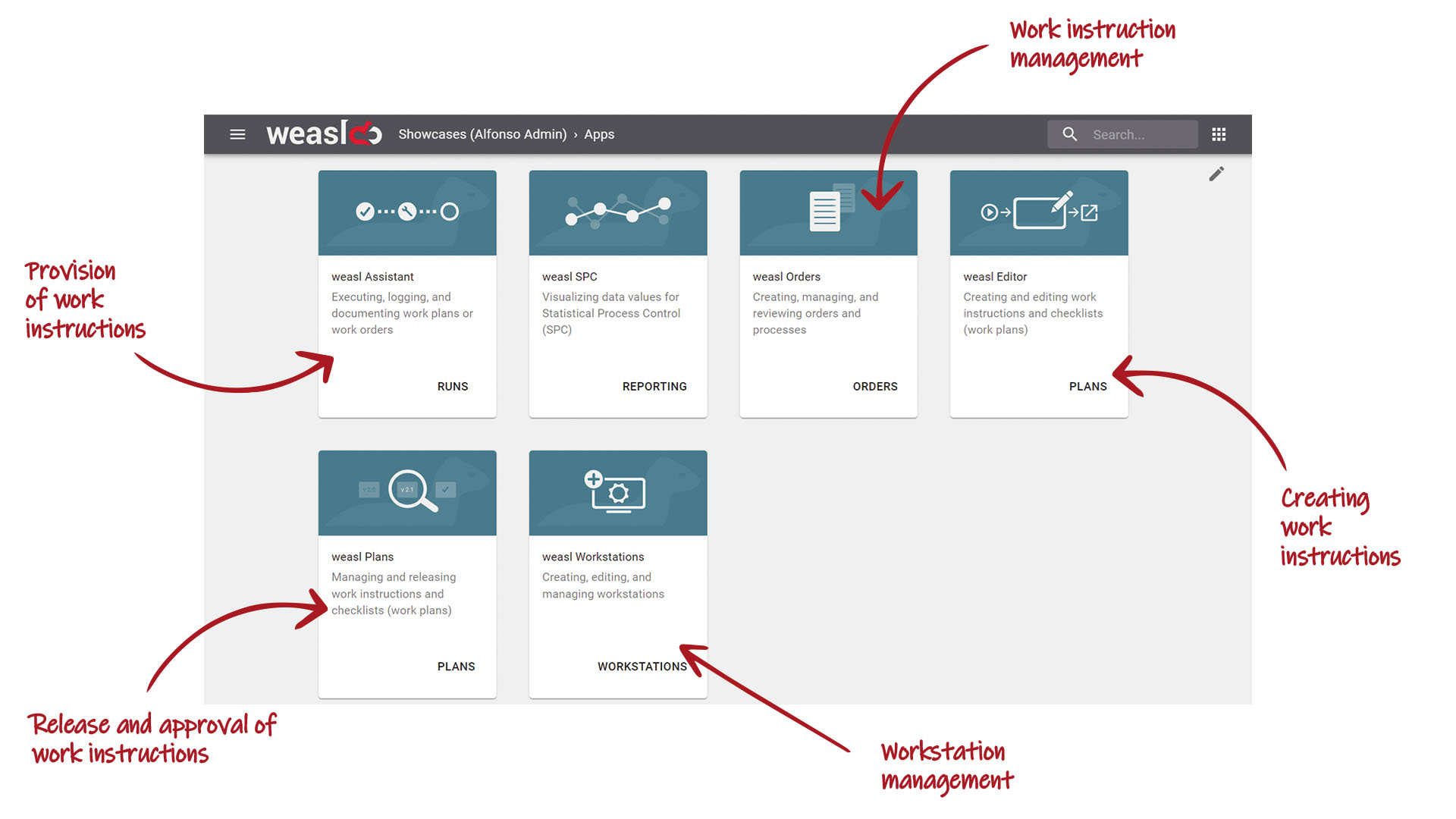
Use the selected system to modernize your work instructions and perfect them with the available options. Modern solutions such as a worker assistance system usually offer an editor with which you can create digital work instructions without programming knowledge using drag-and-drop.
It is often also possible to import existing digital instructions. However, you will hardly be able to avoid manually adapting the individual work steps here either. The good news is that you will create a valuable basis and simplify every future investment process.
3. make optimum use of the possibilities of the new system
With a modern solution such as a worker assistance system, you have countless options for bundling everything you need for processing in one place. Take advantage of these possibilities and create meaningful, digital work instructions with:
- multimedia content (formatted texts, images, videos, audio files)
- interactive elements, such as checklists
- Input fields for entering data
- Links to further or relevant documents
- Feedback mechanisms
- Notes, e.g. through color-coded markings
- Access controls, e.g. for editing work instructions
- User roles with different levels of detail, for example
- Version control to identify and distribute new versions
- Notification systems, e.g. about changes in the work instruction
- time stamps
- etc.
This allows you to create not just a new digital work instruction, but a single source of truth that
- provides all important information
- optimally helps to avoid errors
- mentally relieves your employees
- saves time and costs
- is easy to update, distribute and duplicate
-
records and documents all important data in the ongoing process

André Nimtz has been working in Online Marketing since 2011—bringing a rare combination of technical expertise, linguistic precision, and a dash of wit. His love of writing developed during his childhood, and his style and methodology were honed ...